RoomState
Privacy-protecting occupancy. Edge-based video analytics.
RoomState is a privacy-protecting, camera-based occupancy sensor. It counts the people in a room so heating and cooling can be analyzed and scheduled against real usage. Everything runs on one Hellbender Tendryl, no image data leaves the device, and a single room needs no gateway. The Tendryl is a general-purpose Linux computer with a camera on it, so the same hardware in the same mount can carry more sophisticated use cases later.
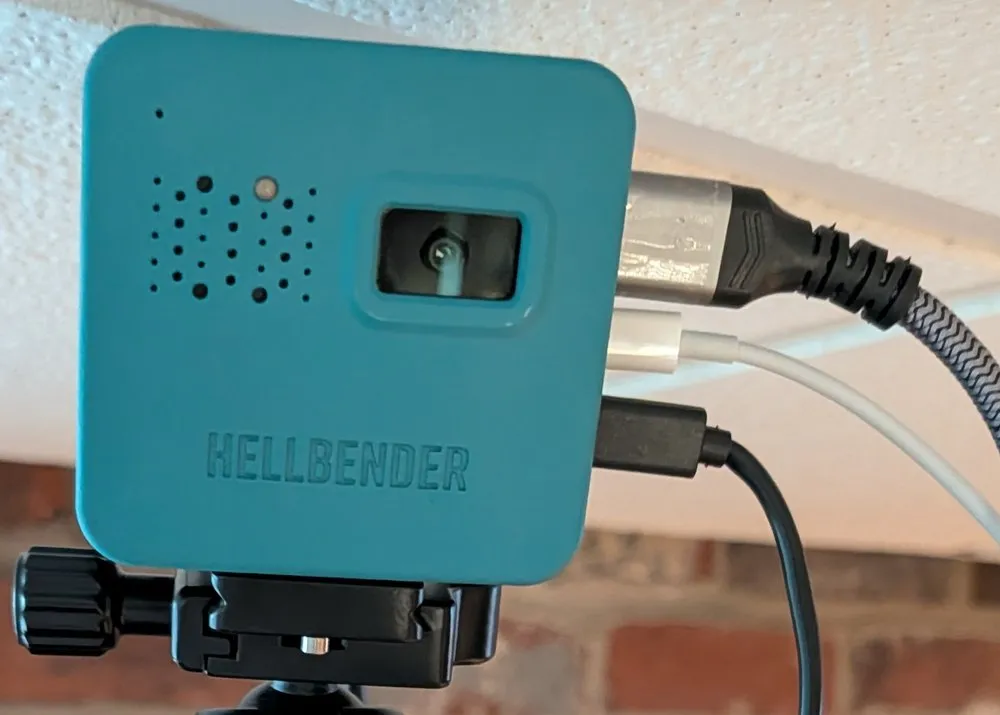
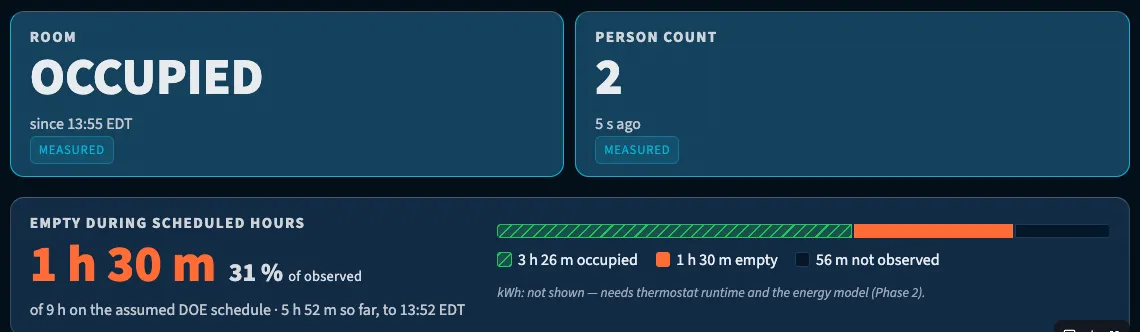
RoomState runs today. It writes a detection record every five seconds, derives an occupied or unoccupied state from it, and reports the hours a fixed conditioning schedule ran against an empty room. APES, my spec-driven framework for building software with artificial intelligence (AI) agents, took it from first commit to a deployable proof-of-concept in ten days. The privacy design and the build method are the finished parts, and they are what most of this page covers. Three things are open: accuracy is uncertified, load above two people in frame is untested, and the kilowatt-hour figures wait on access to a commercial building.
The problem
Fixed conditioning schedules
Buildings heat and cool rooms whether or not anyone is in them.
Commercial buildings condition rooms on a fixed schedule. Heating and cooling an empty conference room from eight to five costs real money and doesn’t get reported on, because the building has no idea the room was empty. RoomState measures the occupancy side of that directly: how many people were in a room, at what times, against the schedule the building is running.
The design
Choosing a sensor that can count
A camera reports a count with a position and a confidence, and the record stays open to reinterpretation.
Buildings sense occupancy today with four kinds of sensor, and each is specified for a real reason. Passive infrared (PIR) carries the installed base: it costs under a dollar, every commercial controls vendor sells one, and it gets chosen as the privacy-preserving option, because a camera in an occupied room is intrusive [1]. Millimeter-wave (mmWave) radar is the current upgrade, holding presence through the stillness that defeats PIR, in packages that install without a wiring run [5]. Thermal arrays answer the privacy question at the sensor, since a coarse heat image has no face in it. Carbon dioxide (CO2) sensing has the compliance role, because demand-controlled ventilation is specified against occupancy and the CO2 sensor is the instrument that measures it [2].
What all four report is the room’s state. A PIR sensor reports motion, so a room of people sitting still around a table can read as empty a couple of minutes into a meeting [1]. One person and nine people produce the same PIR reading [2]. The radar occupancy products a building can buy report whether the space is occupied [5], thermal arrays report a heat field at a resolution chosen to keep faces out of it, and CO2 tracks a gas that accumulates, which the survey measuring it describes as a very slow response [2]. A schedule built on any of them knows whether to condition the room, and it cannot say how much of the room is in use.
Fine-grained occupancy data in demand-controlled ventilation could save more than half of the ventilation energy, and the accurate way to get that data is a camera, whose adoption privacy concern holds back [2]. So RoomState puts a person detector on a camera and writes a record every five seconds holding every detection above a low confidence floor: class, box, confidence, no count. Counting is a downstream decision. What qualifies as a person, and what qualifies as an occupied interval, are settled from records already on disk, so either definition can change next month without touching the sensor or revisiting the room. A presence signal answers one question and answers the same one next year, while a stored detection can be asked a question that had not occurred to anyone when it was recorded. That reinterpretable record is why I built this on a camera, and it is why the same device has a path to more sophisticated use cases.
Privacy from the start
Five protections were specified before the collection pipeline was built.
A camera in an occupied space carries privacy obligations that a motion sensor does not, and the concerns behind them are well founded. A networked camera can capture identifiable images of people who have no practical way to check how they are used, and in a shared office or a classroom those people have not chosen to be recorded. Occupants, facilities staff and legal review will all ask the same question, and a product without a concrete answer to it does not get installed. So the protections were specified before the collection pipeline was built:
- The occupancy record cannot carry an image. No image data leaves the device, and the record type has no field a frame could occupy.
- Nothing is transmitted at all while the device is collecting.
- The model counts people and does not identify them. No faces, no names, no tracking across time.
- Frames stay local. Sampling ships disabled; when it is enabled, frames are written to the device only and deleted on a retention timer the host controls, down to immediately. What is retained is per-frame metadata.
- Radios and video outputs the application does not need are disabled below the operating system.
Four of those are enforced by the shape of the software. The fifth is retention, where a timer the host sets deletes the frames and the process that writes them has no say in when they go.
Use cases beyond occupancy
The same records support classroom utilization, desk-level density and dwell time.
Classroom utilization, desk-level density and dwell time can all be built from the same data records as occupancy. Utilization is the best documented of the three: institutions measure it against formal standards and miss them. Those standards come in two parts: how many hours a room is scheduled, and how many of its seats are filled. The second is a count of seats in use rather than rooms in use, which is the measurement a motion sensor cannot make [3].
Application walkthrough
The dashboard shows the empty conditioned hours
The dashboard is built for a facilities manager who owns the heating and cooling schedule. It runs as a web app and reads data pulled from the device. It never touches a frame, and nothing is hosted.
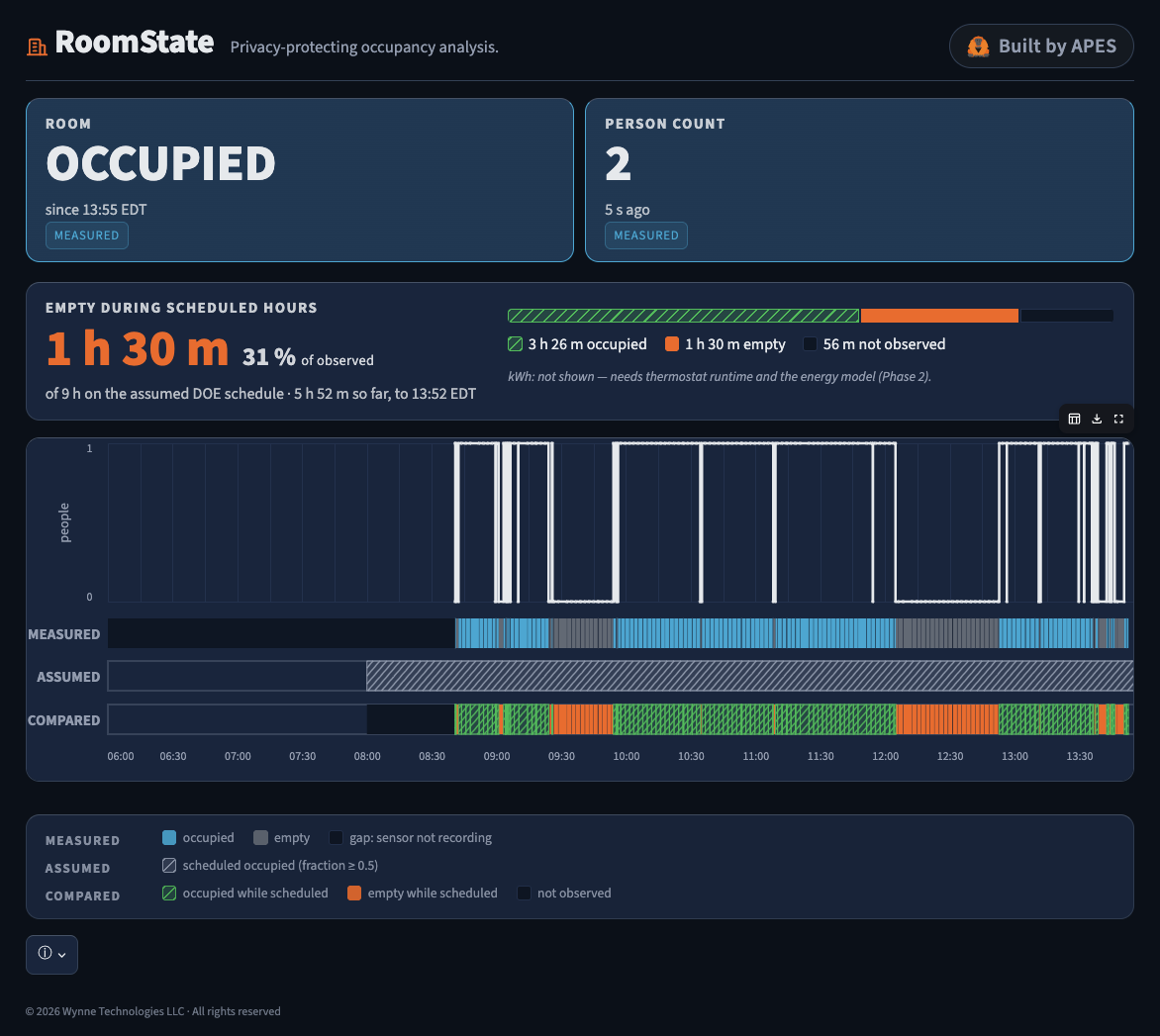
RoomState dashboard, September 9, 2026. One day, one occupant, my home office.
Five things are on screen:
- Person count. How many people the camera detects in the room right now.
- Measured occupancy. A timeline where blue marks the intervals when people were actually detected, grey marks intervals with none, and dark blocks mark intervals the sensor was not recording.
- Assumed occupancy. A second timeline carrying a Department of Energy (DOE) small-office reference schedule, standing in for the building’s real conditioning schedule. It is hatched and labeled so nobody mistakes an assumption for a measurement.
- The comparison. The two timelines drawn against each other.
- Empty scheduled hours. Orange blocks where the schedule assumed the room was occupied, and therefore conditioned, and the sensor found it empty.
The orange blocks are the point of the screen. If heating and cooling runs all day and a conference room sits empty for hours, those are the hours to take out of the schedule.
The scheduled day splits three ways: occupied, empty, and not observed. Unobserved time gets its own bucket, because counting it as empty would overstate the waste. My office on September 9, with one occupant, captured 5 hours 52 minutes into a nine-hour scheduled day: 3 hours 26 minutes occupied, 1 hour 30 minutes empty, 56 minutes not observed. Empty is 31% of observed scheduled time. The dashboard names that denominator on screen.
The kilowatt-hour tile stays blank until there is thermostat runtime and an energy model to fill it.
Architecture
Software components
Everything runs on the camera, so a single room needs no gateway.
The camera is both sensor and collector, so there is no second box to install, secure, or get approved. One room needs no gateway at all. Multiple rooms need a different architecture, and the answer there is one local gateway serving N cameras, with the per-camera collection path unchanged.
One daemon and three timers
Everything runs under systemd. One inference daemon holds the Hailo-8 and writes records. Three timers do the rest:
- Retention deletes frames on the host’s schedule.
- Aggregation turns raw detections into the occupancy series the dashboard reads.
- Health writes a heartbeat and flags a device that has stopped producing.
The record and the interval
A record every five seconds, holding detections and no count.
A record every five seconds holds every detection above a low confidence floor: class, box, confidence, no count. Counting is a downstream decision and stays one.
Five seconds is a policy choice about resolution. The interval is already finer than occupancy changes and much finer than an HVAC (heating, ventilation and air conditioning) cycle responds, so the series rolls up to any coarser window later without going back to the room. Frame sampling is a separate setting and a separate question, covered under privacy: the records described here carry no image data at any interval.
The sensor
One Tendryl, standard parts, with the detector file hashed at setup.
- Raspberry Pi CM5, 4 GB RAM
- Hailo-8 accelerator
- Camera Module 3 behind a 66° by 41° lens
- Supplied power adapter in the lab, with a separate Ethernet run; PoE (Power over Ethernet) in production, one cable carrying power and data
- Detector
yolo11l, with the exact model file hashed at setup, so every record says which detector produced it - Full sensor mode, 2304 by 1296, read back from the driver at startup and refused on a mismatch, so the field of view is always the one the lens spec describes
Sensor placement
A high corner down the long diagonal gives the most floor per pixel, and the fewest overlapping bodies of any position a wall or a tripod allows.
Placement matters more than anything in the configuration. Corner of the room, as high as the mount allows. For the RADD booth I will use a tripod that reaches 9.5 feet. A corner view down the long diagonal gives the most floor per pixel, and among the positions a wall or a tripod allows it puts the fewest bodies in front of each other. Overhead is the classic counting geometry and the published work uses it [2]. Overhead also sees fewer overlapping bodies than any corner does, which is the occlusion problem covered below, and the tracking layer is what recovers it.
The corner is a trade against the lens on hand: a 66° by 41° field covers a room usefully from a high corner, where a ceiling position would want something wider. The trade is also practical. Retrofitting a ceiling camera into an auditorium-style classroom is harder than adding a corner mount, and a system that reads a room from either position can go wherever the building allows. Placement is therefore a deployment choice: the same software reads the room from whichever position a given site makes practical.
Throughput and disk
Disk is the constraint.
Compute was never the constraint. Hailo’s own detection demo ran live from the camera at 26.43 FPS (frames per second) with zero dropped frames on the first attempt, and the slowest of the four candidate models managed 14.4 FPS across a 300-frame probe. That is enormous headroom against a five-second interval.
Disk is the constraint, and it is worth knowing before anyone plans a frame-sampling deployment. The sensor is read at 2304 by 1296 and delivered as a 1280 by 720 stream, which is what both inference and a sampled frame get, and it is the resolution the storage figures use. One 720p frame every five seconds is roughly 24 GB a week against a 14.4 GB root filesystem, and one frame a minute is about 2 GB. Sampling therefore ships off.
Data retrieval
Collection continues without a network.
Data is retrieved over SSH (Secure Shell) after collection, with the dashboard pulling it from the device. If the camera is disconnected, collection continues on the device, and the dashboard retrieves the full history when it reconnects. Nothing is scheduled to push anywhere, so the device never needs a network in order to keep recording. Statistics regenerate in full on each pull rather than being appended incrementally, so a re-pull cannot leave a half-updated store, and collected data survives power loss. At power-on the device takes its time from the network and collection waits for that to resolve, so every record carries a correct timestamp.
How the privacy claims are enforced
The five protections in the software
The mechanism behind each of the five protections.
- A record type that cannot express image data. No byte-bearing field type, text fields bounded and rejecting anything resembling a path or an image extension, and a parser that refuses keys it does not recognize. Something upstream trying to hand it a frame would have nowhere to put one.
- No network hop in the collection path. Capture, inference, retention and aggregation all run on the Tendryl. The dashboard pulls results afterward over SSH, so nothing is transmitted while the device is collecting.
- No identity anywhere in the pipeline. Detections carry a class, a box and a confidence. No face, no name, no track across time. The face recognition application that shipped on the unit was removed, and I verified its absence at two fixed paths after a reboot.
- An independent deletion timer. When sampling is on, a systemd timer separate from the pipeline that writes frames deletes them on the host’s schedule: seven days on my own premises, twenty-four hours in someone else’s building, zero if the host wants zero. The process that writes frames does not decide when they go.
- Radios and outputs closed below the operating system. Bluetooth is disabled in the device tree. HDMI drives a physically attached screen through a fixed list of local sinks that a config edit cannot point at a network.
The published state of the art takes a different route. The survey at [2] proposes an overhead camera that encrypts the pixels inside each detected person before counting them, so its privacy guarantee rests on the encryption holding. RoomState’s rests on the record having no field an image can occupy. The difference matters in a deployment: an encrypted-frame system still has frames to store, transmit and eventually decrypt.
What the device sends
Three packet captures carried no image or video.
Three five-minute captures on August 26, one in default mode, one with video output enabled, one in debug mode. Each carried roughly half a megabyte, and none of it was image or video. The rest was clock sync and network discovery traffic (NTP, mDNS, SSDP) plus my own SSH session.
Two caveats. The captures covered the wired port, so Wi-Fi and USB-C still need the same treatment. And no single test proves that frames never leave the device: the claim rests on the record type, the captures and the deletion timer together.
Device custody and patching
The demo runs on a direct connection, and production custody is an open question.
Privacy review asks who holds the keys, who applies the patches, and who can change the configuration in someone else’s building. RoomState answers all three the way a bench demo does: the device connects directly to my laptop with its radios off, the SSH key is mine, and I am the only party who can change the retention schedule. A production install moves all three to the building’s side, and there the questions are contractual before they are technical: whose key reaches the device, who is accountable for operating-system updates on a camera that may sit in a ceiling for years, and whether the host or the occupants’ representative sets retention. A pilot in someone else’s building settles them before it installs anything.
Method: How APES built RoomState
Why the whole lifecycle
Optimizing the coding step alone moves the total very little.
Writing code is one step of getting a product into production, and it is a small share of the elapsed time. The rest goes to working out what to build, provisioning environments, handoffs between people, testing and approval gates, which is why optimizing the coding step alone moves the total very little in an organization [4]. AI tooling has concentrated on that step because code generation is the easiest thing to automate and the easiest thing to measure. Even an instant coding step would leave the rest unchanged.
APES (AI-First Product Engineering with Specs) is my own spec-driven framework for working with AI agents, and it applies AI from working out what to build through operating what shipped. It ships as a plugin for Claude Code: slash commands, skills, coding guidelines and architecture practices, so every phase and every review gate is a command I run. Work is organized as a roadmap of milestones, epics with features under them, and specs beneath those.
The four phases
DEFINE, DESIGN, BUILD, OPERATE, each producing its documents before the next starts.
APES runs a project through four phases in order. Each phase has its own commands and its own documents, and a phase has to produce them before the next one starts. What follows is what each phase does, and what it produced on RoomState.
DEFINE (/apes:define, /apes:intake) works out what the product is for and who it is for, and records which of those steps are done. Here it produced the problem statement, the constraints, the risks, the success criteria, and five personas.
DESIGN (/apes:design, /apes:decide) chooses the architecture, writes the roadmap, and records the decisions. Here it produced the architecture overview, the roadmap and the first decision records.
Decision records are the part of APES I would keep if I had to drop the rest. Each one states the decision, the options it rejected, what gets better, what gets worse, and how big a deal it is. Writing the rejected options down is what makes a decision cheap to reverse, because the reversal argues with a document instead of someone’s memory. Partway through I reordered the whole publication plan, and the record that did it took an hour to write.
BUILD (/apes:plan, /apes:implement, /apes:review) breaks an epic into features and specs, then runs them through the review gates to a pull request ready to merge. Here every spec was written before its code, and each one carries its acceptance criteria as a checklist, a test specification and a technical approach.
OPERATE (/apes:retro, /apes:status, /apes:operate) closes out a session or an epic and reports where the project stands. Here it produced the retrospectives and the learnings, plus a list of operational jobs that are not code, like building the camera mount.
Privacy carried through every phase
The requirement is traceable from the phase that named it to the test that checked it.
Every one of the four phases produced an artifact for the privacy requirement. DEFINE named it as a constraint, before any architecture existed. DESIGN turned it into two decisions, each with a record behind it: a record type with no field an image could occupy, and a collection path with no network hop. BUILD wrote the spec for that record type, carrying its acceptance criteria and its test specification, before any collection code existed. OPERATE checked the requirement against the built system, which is where the packet captures above came from, along with the removal of the shipped face recognition application and the verification of its absence after a reboot.
The requirement is traceable from the phase that named it to the test that checked it, and every step left an artifact in the repository. This is the shape of thing APES is for on a project like this one: a requirement that has to hold across hardware, software and operations, carried by documents rather than by memory.
Adversarial review
Five agents read every spec, none of them inheriting the author’s reasoning.
Four agents read each spec before any code exists, each working alone from a single role and the one question that role asks: Architect, “Will the design hold?”; Implementer, “Can it be built as written?”; User, “Does it solve the real problem?”; DX (developer experience), “Can it be tested and maintained?” A fifth agent runs after a wave is built, gets the acceptance criteria, and is told to assume the work is wrong and find what those criteria failed to ask for.
Reviewer and author are the same model, so what the separate seats buy is four readings that do not inherit the reasoning that produced the spec. On this project the ship review found a cache keyed on an argument Streamlit quietly ignores, which would have frozen the dashboard chart until 6am the next day. Fixed seventeen minutes later.
Parallel waves and the semi-autonomous loop
Specs declare their dependencies, so APES builds a wave at a time under separate agents.
Each spec declares what it depends on. APES sorts them into waves, builds everything in a wave at the same time under separate agents, and holds the next wave until the current one has passed verification.
The loop can carry an epic through several cycles without me, inside token budgets and halt conditions, with each gate granting only the actions it is allowed to take. A gate becomes unattended only after enough human decisions in a row have agreed with it.
Build time
Ten days from first commit to a deployable proof-of-concept, with the spec discipline intact.
Ten days from first commit to a stable, deployable proof-of-concept. That span includes DEFINE and DESIGN, the foundation milestone closed with sixteen specs verified on the device, and a rebuild of the dashboard around the schedule comparison.
Two things made the pace possible. The Tendryl platform is natural and unsurprising to work with, so almost none of that time went to fighting hardware. And APES held the engineering discipline at that pace: every spec written before its code, every decision recorded with the options it rejected, and a review gate at both ends of every epic, including the one that caught the dashboard cache defect above. On a ten-day solo build, that discipline is the first thing I would expect to be dropped.
The ten days says nothing about the lead-time problem this section opened with. One engineer, no handoffs, no approval gates, no queue between stages: the wait time that dominates a real value stream [4] was absent from the span, and nothing here measures what APES does to it. That is the part a client organization brings, and it is what the four phases and the decision records are built for.
Where RoomState stands today
RoomState derives a count for each five-second interval from the stored detections, and an occupied or unoccupied state from that count, with gaps accounted for.
Stability and load
No crashes, and load is untested.
The unit has not crashed. Every gap in the record is written down with its cause: device-off time, a redeploy, or the clock hold at cold boot. An empty room and an unobserved one look different in the data.
Load is untested. So far there have only been one or two people in frame. A full room means people overlapping each other and people small in the far corner of the frame, where a body covers few pixels of a 1280 by 720 stream. I need a real room with real occupancy before I can put a number on that.
How accuracy was measured
One measurement against four models, and no certified number yet.
There is no certified accuracy number yet, and getting one needs about 40 hours of annotated video across six non-consecutive days. One measurement exists. I recorded a fifteen-minute clip of myself walking the room, with a monitor playing a talking-head video as a decoy, and scored four models against it: YOLOv8 and YOLOv11, each in large and small. v11 large won.
Where the models missed
All four overcounted, and the error has a single identified source.
I set four thresholds. Every model passed two and missed two: average error, and empty intervals reported as occupied. All four overcounted. For the conditioning schedule that is the safe direction, because a room called occupied stays comfortable. For the analysis it is the expensive direction, because an interval wrongly called occupied is a savings hour the report never shows. The empty-hours figures RoomState produces today are therefore a floor, and a corrected detector moves them up.
Most of the error is the decoy monitor, which every model read as a person. That makes the bias systematic and addressable: box size should separate a face on a screen from a body in a chair, and I have not tested that yet.
Occlusion
Tracking a person across frames is the difference between a model output and a product.
Occlusion is anything blocking the camera’s view of a person, and it is the hardest part of detection and tracking. At a standing desk the desk hides the middle of a body, so the model sees a torso and a pair of legs and counts two people. A production counter does more than run the model: it tracks each object across frames and keeps a set of features for it, so one person stays one person. That layer is where companies like Bosch make their money. It is hard to get right, it is never fully right, and it is the difference between a model output and a product.
Energy
Kilowatt-hours need a commercial building.
Turning occupancy into kilowatt-hours is the next phase. It needs three inputs: a real room, that room’s HVAC runtime, and an energy simulation matched to both. The instrumented room so far is my home office, so the work waits on access to a commercial building.
Working with the Tendryl
Very easy to use
The image arrived with Hailo’s runtime, hailo-apps and the Raspberry Pi camera stack installed and working together, and Hailo’s detection demo ran live from the camera on the first attempt. That integration work is Hellbender’s, and the build time above rests on it. My credential request was answered within hours, with pre-release documentation attached.
Standard parts all the way down
Linux on a Pi with a Hailo accelerator means standard YOLO models are available, along with the whole Pi camera and peripheral ecosystem, systemd for process supervision, and apt for everything else. There is no vendor SDK between me and the hardware. The application itself is ordinary Python: uv for packaging and environments, the Raspberry Pi camera stack for capture, Hailo’s runtime for inference on the accelerator, and Streamlit for the dashboard. I wrote no platform-specific code.
Production installs will run on PoE, and one cable carrying power and data turns two days in someone else’s building into a conversation about a power run. PoE is also part of why the unit reads as a real device rather than a dev kit.
Compared against Bosch’s camera platform
At Azena the effort went to the operating system, and on the Tendryl it goes to the application.
Before Wynne Technologies I directed the innovation accelerator at Azena, Bosch’s camera application platform, which set out to open smart cameras to third-party developers on a modified Android. I watched capable developers stall there, spending their effort on the nuances of that operating system before they could build anything on it.
The Tendryl runs a standard Linux distribution, so a developer starts from knowledge they already have. On RoomState the effort went to the application from the first day.
About me
I run Wynne Technologies, an AI-first product engineering consultancy in Pittsburgh. Every application I build goes through APES. Before this I was chief software architect at Pacific Northwest National Laboratory, working for the Department of Homeland Security and the Department of Energy.
Your next product, built by APES: wynnetech.ai/services
References
Shokrollahi et al., “Passive Infrared Sensor-Based Occupancy Monitoring in Smart Buildings: A Review of Methodologies and Machine Learning Approaches”, Sensors 24(5): 1533, 2024. Peer-reviewed review. Finds that PIR sensors “frequently fail to recognize stationary individuals, causing errors in occupancy counts.”
Ahmad et al., “Occupancy detection in non-residential buildings: a survey and novel privacy preserved occupancy monitoring solution”, Applied Computing and Informatics 17(2), 2021. Peer-reviewed survey. States that “a PIR sensor can only detect the presence/absence of an occupant and cannot count the number of people,” notes PIR’s susceptibility to false-off readings, estimates that fine-grained occupancy data in demand-controlled ventilation “could save more than 50% of the energy,” and identifies privacy concerns as the barrier to camera-based detection, which is what motivates the authors’ own privacy-preserving design.
Amon, R., “USHE Space Utilization: Classrooms and Laboratories”, Utah System of Higher Education, March 2018. State higher-education system report. Sets targets of a 75% room utilization rate across a 45-hour week and a 66.7% station occupancy rate; measured roughly 30 hours against the 33.75-hour target, with station occupancy near 53%.
Kim, G., Humble, J., Debois, P., and Willis, J., The DevOps Handbook: How to Create World-Class Agility, Reliability, and Security in Technology Organizations, IT Revolution Press, 2016. Practitioner reference. Uses value stream mapping to show that deployment lead time is dominated by wait time, handoffs and approval gates rather than by hands-on work, so improving a single stage yields little change in overall time to market.
Logitech, “Logitech Spot: an easy-to-deploy presence and environmental sensor”, product flyer, accessed September 2026. Vendor documentation. Describes “radar-based sensing” that “precisely detects whether spaces are occupied,” and specifies occupancy status as the reported output, with no people count.